PicApport - Navigator (Webinterface)
Overview
The Navigator is PicApport’s Web Interface
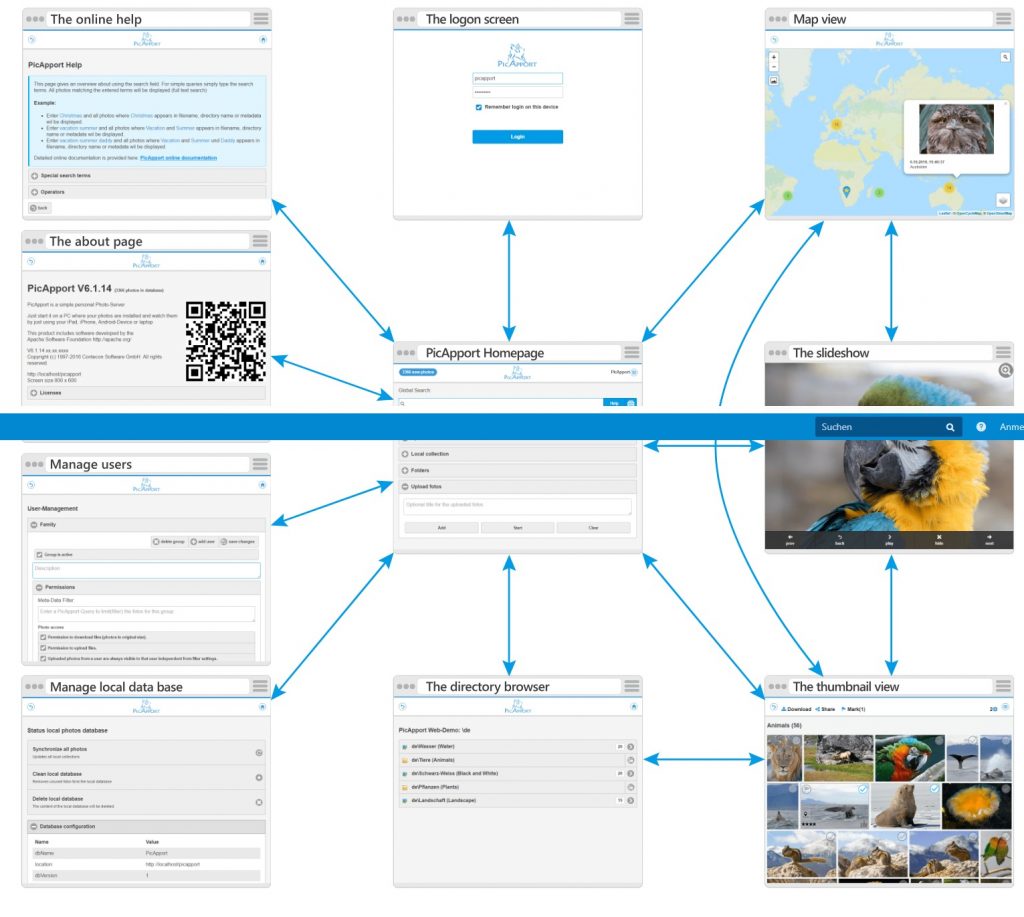
The web interface is divided into the following pages:
- Home (landing page)
The home page is used to select and manage photo queries stored on the PicApport server. - Online help
Explanation of the built-in query language and keyboard shortcuts. - Map view
If a photo contains GPS-Metadata it can be located on the built-in map module. - Directory browser
The directory browser represents the folder structure of the server and displays them as a list. - Thumbnail view
The thumbnail view shows a small preview of the selected photos.
If you are permitted you can also share and download photos from here - Slideshow
The slide show is for viewing selected photos. A play function makes each tablet or smartphone an electronic picture frame - User Management
The user management allows you to create, modify and delete users and user groups. - Function keys, mouse and touch gestures
Overview of all function keys and mouse gestures on all pages - Other management functions
See sitemap below
Bookmarks
For the pages described below bookmarks can be set. The bookmarks are „dynamic“.
E.g. If you set a bookmark is on the slideshow for all photos with the keyword „holiday„, all holiday photos will be displayed, even if your photos did not exist when you created the bookmark.
Bookmark enabled pages:
- Thumbnails
- Map
- Slideshow
- Online help
PicApport Web Interface Sitemap
The following diagram gives an overview over the page navigation system
Just click on one of the pages below to get more information